facebook,google

adsense

Wednesday, 6 June 2012

Change Facebook Theme Color, Appearance, Skin, Style or Template

Change Facebook Theme
It is a fact that almost everyone is on Facebook but it is also a fact that not everyone is happy with the default blue theme on Facebook. Some even consider it a turnoff while visiting Facebook.

It is relatively easy to change the Facebook theme to a stylish one using a Firefox addon and a custom theme which are available free of cost on the internet.

The final outcome would be something like in the image.


Requirement: The basic requirement for this to work is to have Mozilla Firefox 3.5 or higher.

Steps: The following steps should be carried out to successfully change Facebook theme.

  1. Open Mozilla Firefox and install 'Stylish' addon.
  2. Follow the basic steps and install the addon.
  3. Restart Firefox after successfully installing the stylish addon.
  4. Login to your Facebook Account and click on the small 'S' button in your Firefox status bar.
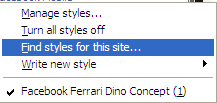
  5. Click on "Find Styles for this Site" to open a new tab with free themes to use for Facebook.
  6. Click on any theme and a preview will be shown.
  7. If everything is fine in the previewed theme, click on "Install with Stylish" button at the top right corner of the page.
  8. A dialog box will open.
  9. Click on Install in the dialog box.

Stylish Button


facebook theme change

Install with stylish

Installing Ferrari theme for Stylish Firefox


Now whenever you open Facebook, it will show the theme that you have installed with Stylish instead of the boring old blue theme.

9 Tips to get more Twitter Followers

The tips are just a matter of my twitter experience. Use them wisely for getting good number of followers and have a great time on twitter.


  • Tip 1: Follow to get followed, but take it easy. Don’t follow 500 people a day. Keep your following/followers ratio near 1:1. Let’s say you follow 500 people and have 500 followers, then it would not be wise to follow 500 more in one day, rather in a week or more.
  • Tip 2: Provide value, share interesting stuff, give relevant information. If you read something interesting on the web, share the link. Participate in conversations.
  • Tip 3: Fill in your bio and picture. People get turned away if there’s nothing to see in your Twitter profile. Write something about yourself and add a picture, preferably one that shows you. People like to know who they talk to.
  • Tip 4: Create a blog or a website. In addition to filling in your bio, a link to your blog will provide more information about you. It will show your personality in a more detailed way than the short bio in your Twitter profile.
  • Tip 5: Re-tweet whatever you find valuable and reply to your followers. They will do the same to you and your name will appear to their followers.
  • Tip 6: Participate in a Twitter party. If there’s a Twitter meetup in your area, make sure to be there. You’ll find many new followers there.
  • Tip 7: Share your Twitter username on your social networks, on the forums and blogs, get listed in Twitter directories.
  • Tip 8: Be you and be original. Don’t be afraid to say what you think. A good opinion on something will get retweeted or replied to and will expose your profile. Also, personalize your profile, change colors and background.
  • Tip 9: Tweet regularly. That doesn’t mean you have to tweet 24/7, but try to do it every day. If people see your profile was last updated 1 week ago, they will probably not follow you.

Shorten the Facebook Fan Page URL

This post is dedicated to all the facebook fan page admins. You may have created your facebook fan page and must had got good amount of likes to the page by number of facebook users. The facebook fan page url was very long. It consisted of Page id and page tag too. But now you can add desired username to your facebook fan page url. Actually this process could had been done months ago. But due to humble request of our visitor of technary this post was important for him. To get the desired facebook page url name visit http://www.facebook.com/username


If you are an admin of some pages then all those pages will be listed down. Then you can change the username of the pages. Prior to this you may have used your facebook page url for marketing of the page. Do`nt worry that link will be re-directed to your new desired username. Please choose the name wisely and correctly. There are very few chances of changing the url name again. For example we changed our facebook fan page url to http://www.facebook.com  which is very much cool and specific to the page name. It also resembles the name of the website in the name. Many influential bloggers are changing the name to specific keyword on to which they want to get most of their traffic from. If you have not changed the facebook fan page URL now is the right time.

SEO tip for images

SEO tip for images
SEO(Search Engine Optimisation) is a very important aspect as I explained in my previous posts. Now we shall discuss about the importance of SEO in the images. Now a days the websites whose images are doing good in SEO are getting good page views or a better amount of traffic. The reason is very specific. If your image of the website tops the image list in grid view for a specific keyword then you likely get a good amount of traffic from that image. So any image is also important for bloggers around the world. The SEO game is involved in many aspects including the images. For example if you see the image hosting websites or any wallpaper websites. The total traffic gained is not only from the name of the image but the image`s caption and Alt tags which help it to get better rankings in SEO.

 
A tip for regular bloggers is that when you upload an image to your blog kindly add an Alt tag in it. The reason is that you can write the specific name of that image in the Alt tag. The name can be a name of your post or any keyword which you would like to stress on. The SEO process not only sees or checks the post content for the keyword. In case of images the Alt tag is also concerned a great importance in getting good respect in SEO earnings. You rank of your specific post will surely increase a bit in Google images and you can get a benefit from it. The best part will be the additional traffic you will get from it. Everyone needs traffic then why not use this resource useful by just adding a simple Alt tag. I am giving an example for an Alt tag which can be added in your html code of the image.
<img src="Image name.extension" alt="Name of the image/name of the post/Keyword" height="90" width="728" />
Note that the height and width are adjustable as per your convenience or actual size of the image. So my recommendation to all bloggers will be to add a alt tag in your images to increase your blog`s SEO.

Best tool to monitor your website traffic

The best tool for monitoring your website traffic is Google Analytics. It gives you all the information of the incoming traffic to your website/blog in detail. The thing which I liked the most in Google Analytics is that we can set some goals for getting traffic. If the goals are achieved we are mailed. The importance of the Google Analytics report is too high. To get approved for some good ad agencies they ask for the Google Analytics Report. It gives you best results in your traffic.


You can study it and can find out the least traffic source and can improve on it. Its better to improve on the loose traffic and get momentum to cash out on the top traffic source. Th top traffic sources now a days are getting important to website owners. The simple reason is that they want to know from where do people visit the blog/website. Similarly they also want to use this information and make their traffic increased. The Google Analytics code is simple to use. They give us instructions on placing the code on the various types of websites including wordpress, blogger and other sites. The information provided by Google Analytics is immense. It gies traffic sources countrywise/loacationwise and the browsers the visitors are using. Lot of information which can be used well to improve your website. Enjoy this free tool from Google to study the traffic trend of your website.

Improve Cyber Security

improve cyber securityHow to make your PC secure from all the threats in the online world and improve cyber security? Not sure? Then read on. Here is a list of things you should know to improve your online cyber security:-

1. Anti-virus : Probably, one of the first thing which comes into one's mind when thinking about security. An anti-virus is an inevitable tool for the security of a PC. One can either choose a paid version of the anti-virus of his choice or opt for the equally effective free antivirus (only for private users). Before choosing the anti-virus, it is necessary to check whether the anti-virus has resident protection or not. Resident Protection automatically detects viruses when they are loaded into the memory and takes the appropriate action. Thus saving a user from sitting hours in front of the PC scanning viruses. It is important to check regularly for updates. Also do a quick scan (scanning Windows folder, registry, documents and recent downloads) at least once a week and a full scan at least once a month, even if your PC appears fine.


2. Anti-spyware: A spyware is a program which collects private information and sends it to its programmer. Spywares are considered more dangerous than viruses as they steal private information like Windows registration number, bank accounts, credit card's information, site logins, which can be used to harm a user in all possible ways. Login Accounts to social networks like Facebook and Orkut seem to be the prime target. Thus, it is necessary to have a good anti-spyware software with resident protection ,registry monitoring and browser monitoring. Again it is the user's choice to either opt for a paid one or for a free one. It is important to enable the automatic update function in the anti-spyware software and to do a quick scan of the PC once a week. It is also necessary do a full scan once every month for best results.


3. Firewall: A firewall prevents unauthorized or malicious applications from reaching a computer. A firewall is basically needed to protect a PC against Trojans, spyware, worms, hackers, hijackers and other known and unknown threats. However a firewall must not be assumed an alternative to the anti-virus or anti-spyware software. Before choosing a firewall, the most important thing to keep in mind is the ease of use and the amount of customization possible. An often overlooked factor upon choosing a firewall is the amount of resources consumed by it. Keeping all these factors in mind, a good firewall software(free or paid) must be chosen. It is important to read the alerts displayed by it carefully, and select an appropriate action to do.

improve computer security

4. Anti-spam: Anti-spam software has become important because of the amount of spams received by internet users frequently. These scams are the most common cause of cyber crime. Installing one and using it is easy. So don't worry about how to use one. But the only difficult thing is to be patient with it. Its performance will improve over time. You can download any of the free anti-spam available over the web or can opt for a paid version.


5. Windows Update: A very important factor for PC security is updating Windows. It is important to enable Automatic Updates in Windows which helps to get all the latest security fixes. Getting these updates will help Windows work better and will make one's working more secure.


6. Backing Up: It is important to back up all your important data to have a copy of it whenever needed in case of a virus attack. A back up comes in handy in such unexpected situations.

Friday, 25 May 2012

"Windows 7 Manager 4.0.3 Final Portable

Windows 7 Manager 4.0.3 Final Portable
An all-in-one utility to tweak, optimize, tune and clean up your Windows 7, it includes over thirty different utilities to help make your system perform faster, increase stability and security, and helps you to personalize your copy of Windows 7. It bundles more than 30 different utilities. Tweak your system to improve windows startup and shutdown speed; tweak your hardware to increase system speed and performance; Optimize Task Schedule to turn off unnecessary system tasks. Find out which files or folders engross your disk space and shown with chart; Find and clean junk files to increase Hard Disk space; Duplicate Files Finder can scan your computer for files with the same size, name and modification time.


Information
Get detailed system and all hardware information on your system; help you find out the installation key of Windows, Office products; show all detailed information of running processes and threads on your machine; Windows 7 Manager offers 1-clicking cleans your system automatically.

Cleaner
Registry Cleaner can easily checks your registry and repair incorrectly linked registry entries, automatically remove invalid entries; Registry Defrag rebuilds and re-indexes your registry to reduce registry access time and therefore improve application responsiveness.
Name:  okay.gif
Views: 68
Size:  23.9 KB
Name:  mediafire-transpbak.png
Views: 67
Size:  35.9 KB

Name:  thankspa.gif
Views: 69
Size:  106.3 KB